






The landscape of data privacy has shifted. In 2026 and beyond, simply finding strings of text isn’t enough to satisfy auditors or modern regulations like the EU AI Act.
Whether you’re preparing for a compliance audit or starting a trial, knowing how to evaluate sensitive data discovery software is vital. To avoid wasting time on “legacy” tools that rely on outdated regexps, you need a testing strategy that prioritizes context over simple pattern matching.
The following five rules will help you determine if a PII detector uses a true AI data scanner or if it’s just a “dumb” tool that will drown your team in false positives.
1. Avoid the “Donald Duck” Trap
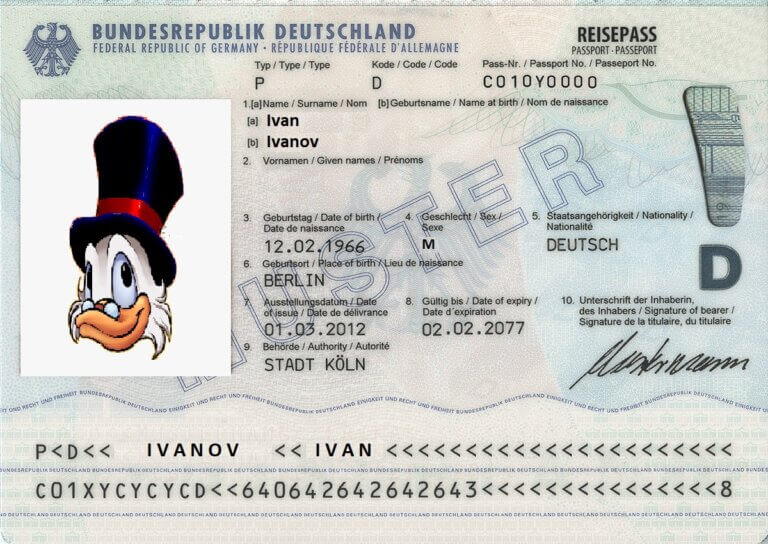
During software evaluations, users often upload files like this “passport” scan to test the tool’s limits:
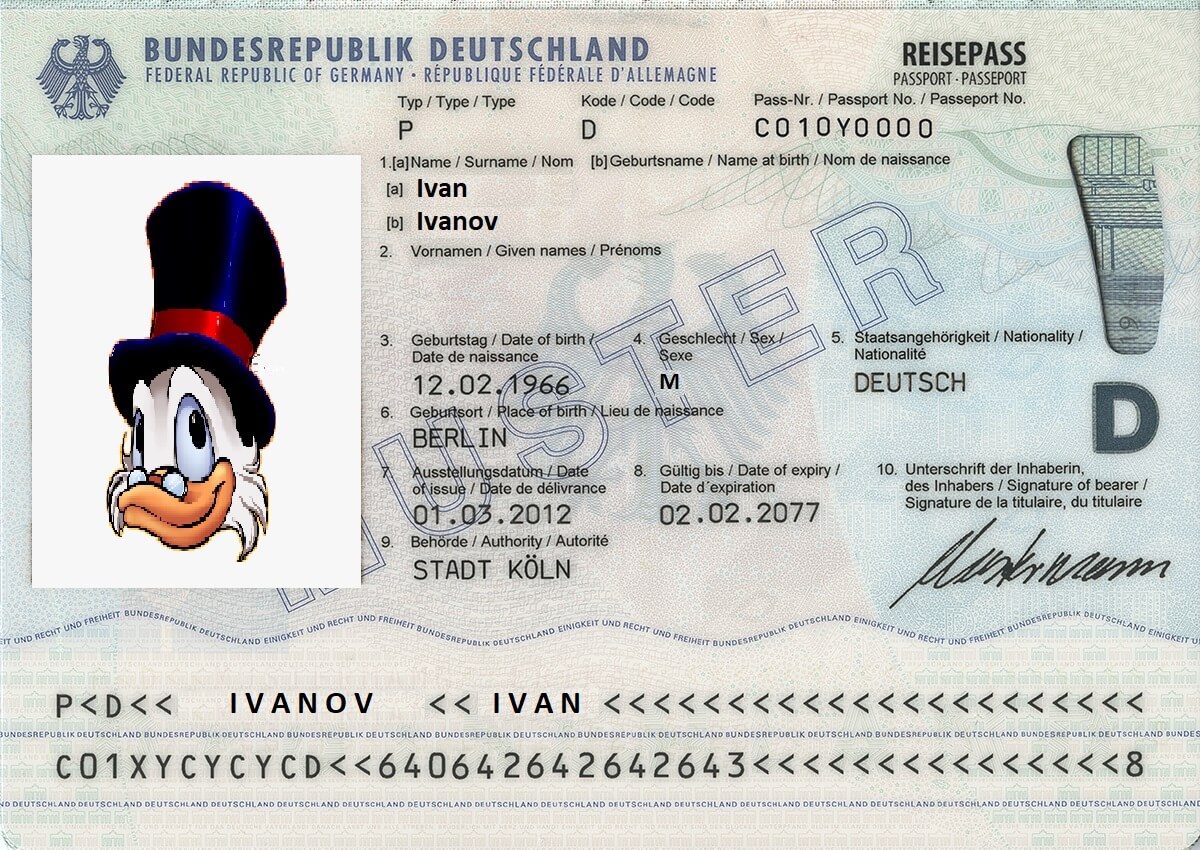
The question: “Why didn’t your PII detector find this passport? Is the software faulty?”
The reality: No, this is actually a sign of a high-end PII scanner. Our AI correctly determined that this image does not constitute personally identifiable information. Donald Duck is not a real person, and a sophisticated scanner is designed to know the difference.
This highlights a major pitfall in PII evaluation: using “overly obviously fake” data. Legacy tools will flag this simply because it matches a visual template, like a passport layout. This leads to thousands of false positives in a real production environment, burying your team in useless alerts.
Modern PII software must use deep learning to see through obfuscation and understand that “Fake” and “Identifiable” are mutually exclusive.
2. Identify the “Specimen” Paradox
A classic “non-PII” example frequently encountered during software trials is a document with the word SPECIMEN watermarked across it.
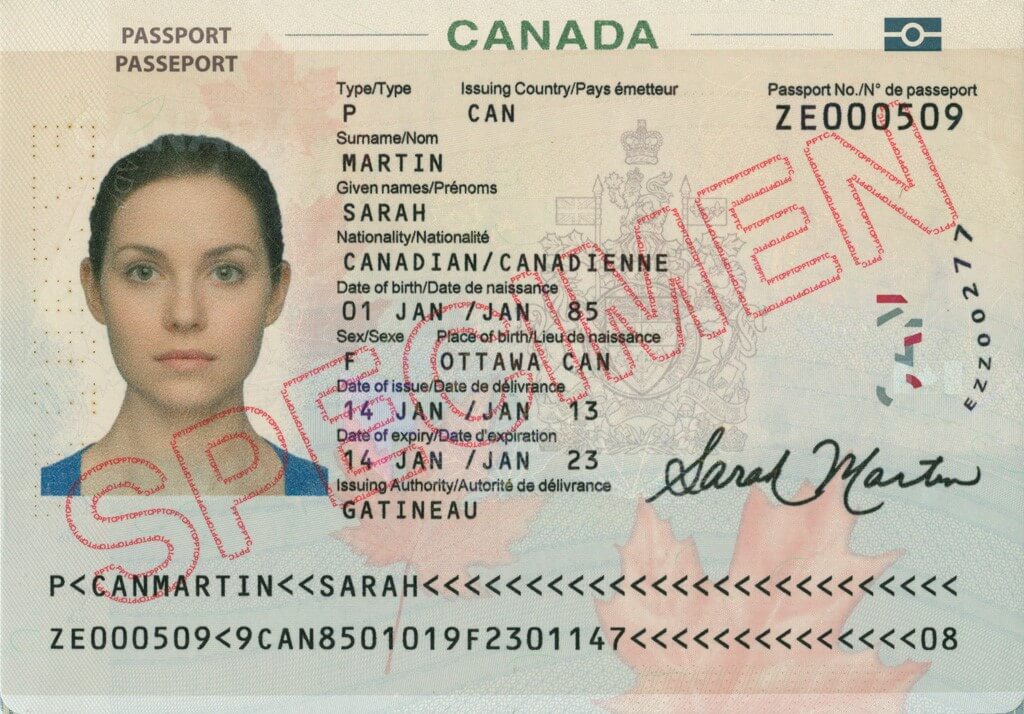
While legacy tools often “pass” naive trials by flagging every document that looks like a form, they fail the real-world test. A truly intelligent PII detector automatically rejects these files. If your software can’t distinguish a sample document from a real privacy risk, it will drown your security team in noise rather than providing actionable insights.
3. Demand Validation Beyond Regex
One of the most frequent questions we receive during evaluations is: “Why didn’t the software detect these credit card numbers?”
The scenario:
A user submits a file stating: “John Smith owns the following airline credit cards:”
- 1912126257871313
- 1912136294662913
- 1912126257870301
The technical reality check:
- Luhn algorithm failure: The first two numbers fail basic mathematical validation (the checksum used by all major card issuers).
- Invalid IIN/BIN: The third number passes the checksum, but its Issuer Identification Number (BIN) is invalid.
- Result: This is not real PII.
A professional PII scanner doesn’t just look for 16-digit strings; it validates data against real-world banking standards and checksums. The same logic applies to IP addresses: detecting 127.0.0.1 (localhost) is not a privacy breach—it’s noise.
By using an intelligent PII detector, you ensure that your Person Cards®, which unify scattered data fragments into a single identity, contain only high-risk, authentic information rather than fake hits.
4. Test Deep within Archives
In 2026, compliance isn’t just about scanning “clean” folders. High-risk data often hides in backups and forgotten archives. Your evaluation should specifically test the tool’s ability to transparently unwrap ZIP, RAR, and PST files. If a scanner cannot efficiently look under the hood of these containers, then it’s leaving a massive gap in your data protection strategy.
5. Use a Specialized 2026 Evaluation Dataset
Sharing real PII for testing is a security risk, and generic “synthetic” data often fails to test a tool’s true intelligence. To help you evaluate software effectively, we have curated a specialized dataset designed to distinguish actual risks from mere keywords.
lyrics.txt: Contains the lyrics to Marvin Gaye’s “Sexual Healing.” While it includes words like “medicine,” “healing” (PHI), or “sexual” (protected PII), a smart PII scanner will correctly determine there is no personally identifiable information (no PII risk). Naive software relying on regexps will be baffled and trigger false alerts.passport.jpg: A high-quality scan featuring a profile photo and passport data to test OCR and visual data extraction.bank_form.pdf: An unstructured PDF containing personal and banking information to evaluate how the tool handles complex layouts.ip-creditcard-email.csv: A structured file filled with IP addresses, credit card numbers, and emails to test validation against real-world checksums.enron-sample.mbox: A mailbox file from the notorious Enron case, perfect for testing how the tool maps PII across email archives.health.zip: A ZIP archive containing PHI. Transparently scanning archives (ZIP, RAR, TAR, PST) is critical for 2026 compliance, as these often hide high-risk “privacy gems” within old backups.sexual_preferences.docx: A Word document containing sensitive information about a person’s sexual orientation (protected PII), testing the scanner’s ability to identify “Special Categories” of data.
PII Sample Dataset – FREE Download
Download the FREE PII sample dataset
Use these files to put any PII software to the test. While this dataset is a great starting point for judging how a tool handles sensitive information, we also encourage you to run scans on your own files to see how the software performs in your specific environment.
Just keep the “don’ts” from this article in mind—look for true intelligence and context, not just simple pattern matching.
Ready to See a Professional PII Scanner in Action?
Schedule a Live Demo or explore our Virtual Product Tour to see how our AI handles complex data discovery in real-time.